Hey everyone,
We've started the year off with some great progress on the features for this campaign - they're all done and ready for you to use right now!
Magnetic Clipping
You can now add holes for magnets to your models in Terrain Tinker - either instead of or alongside OpenLOCK clips. This is an extension of the Digital Clipping we already had, so simply click again on an OpenLOCK clip slot to make it blue for magnets.
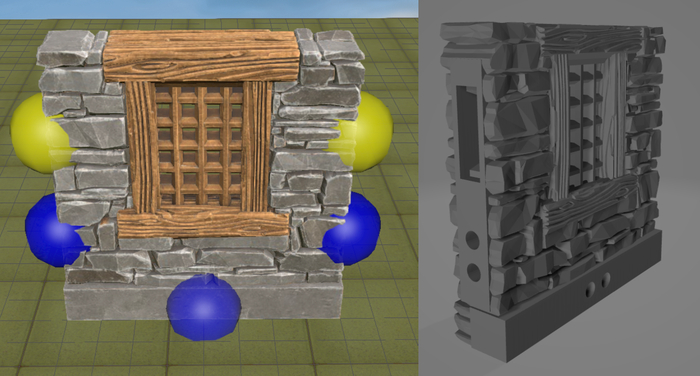
Blue for Magnetic, Yellow for OpenLOCK
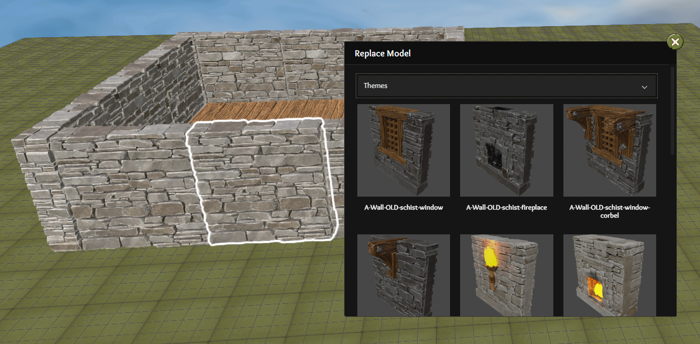
Swap Models
This is a new interface to quickly swap out a model in your scene for another similar model. It works really well alongside the room creator to add some extra flair! Right click on any model and select Replace With to show other models of the same type.
Bonus - Drag Select
This is such a useful & long awaited feature that we decided to add it anyway!
Hold down CTRL (CMD on Mac) then click and drag to select multiple models at once.
Bonus - Model List
We've had some requests to be able to export a list of just the models in the scene without getting the 3D printed files. You can now do this under Tools > Model List and get a list of the models and their quantities for each floor.
And a few extras
The last few things we changed don't seem big, but you will have already appreciated the improvements!
We changed the sort ordering of Models and they now show the most popular groups first instead of the most recently added. This makes the tiles that are commonly used all visible at the top with the less used ones shifting towards the end. So while the Clorehaven Risers which we added last are awesome, they are far less important than the Schist Stone Walls!
The other extra update we made was a load queue for the models. Previously it would preload all the models in the sidebar so they were ready to drag, but this meant it loaded way more models than you needed if you were scrolling through quickly in search of the right one.
Now it will only load the models you stop scrolling nearby and will not load ones you scroll past. This makes the editor run and load much faster! It may sound small but try taking the sidebar for a big scroll and you will see a huge difference.
What's Next?
Our modelers are working on the stretch goals at the moment so we are hoping to have the first of them released soon!
On the development side, there is a small pile of tweaks I would like to make so I now have some time to focus on those. There won't be much to announce with those changes but you will likely see some nice improvements in the Editor and Published Scenes areas. If you find any bugs let me know and we'll use this time to fix them up as well!
Thanks for your support and we'll see you in the next update!
Ryan & the Terrain Tinker crew